Viral Gemini Prompts to Transform Ordinary Photos into Professional Masterpieces
Gemini AI's realistic and professional photo prompts are carefully crafted text commands that direct Google Gemini’s image generator or photo editor to create or enhance images with lifelike detail, natural lighting, and a polished, studio-quality finish.
How to Create Realistic Gemini AI Prompts
Start with a Specific Subject:
- Choose a clear subject for your image, such as “smiling woman,” “boy in formalwear,” or “cafe scene.” Be precise about the main focus.
Add Context:
- Describe the environment, background, and mood of the scene. Examples include “soft window light,” “dappled sunlight through trees,” or “cozy urban café setting.”
Specify Camera Style:
- Include camera settings and styles to add realism. Use terms like “8K UHD,” “DSLR 50mm lens,” “shallow depth of field,” or “cinematic lighting.”
Mention Realistic Details:
- Focus on realistic elements like “skin texture,” “slight imperfections,” “natural shadows,” and “authentic colors.” These make the image more lifelike.
Keep Instructions Concise:
- Offer detailed yet concise instructions. Avoid overloading with too many details; focus on the most meaningful elements to avoid artificial results.
Use Modifiers for Quality:
- Add words like “photorealistic,” “volume lighting,” “editorial quality,” and “retouched yet natural” to guide the AI toward achieving high-quality, realistic output.
Edit and Refine:
- After generating your image, test, adjust, and refine the prompt if the first results aren’t perfect. Make tweaks to improve realism and detail.
How to Use the Prompts in Gemini AI
Open Gemini AI:
- Access Gemini AI via the app or web version, or use the Google Gemini Nano Banana image editor.
Upload Your Base Photo:
- Choose a well-lit, clear base photo for better results.
Apply a Prompt:
- Copy and paste one of the carefully crafted prompts into the Gemini AI interface.
Generate and Review:
- Click "generate," review the AI output, and make adjustments as needed to perfect the image.
Save, Share, or Enhance Further:
- Once satisfied with the results, save your image and share it or refine it further for professional projects or personal branding.
Prompt 1:
"Create a photo of a teenager illuminated only by the screen of a smartphone in a dark room, casting a cool, blue glow on their face, modern and intimate."
Prompt 2:
"Smiling boy outdoors, dappled sunlight through green leaves, cinematic lighting, vivid but natural colors, slight freckles."
Prompt 3:

"Ultra-realistic portrait of a man, DSLR 50mm lens, soft window light, natural skin texture, crisp sharpness, editorial retouch."'
Prompt 4:
"Couple holding hands, sunset beach, sand texture, wind in hair, cinematic and lively."
Prompt 5:
"Street musician playing violin, inspired by Steve McCurry, DSLR shot, shallow DOF, magazine quality."
Prompt 6:
"Woman in raincoat, misty city street, HDR style, water droplets visible, casual realism."
Prompt 7:
"Create a street photograph of a stylish woman in a trench coat hailing a taxi at night in Tokyo, neon lights from storefronts reflecting on the wet pavement, sense of urban loneliness, style of a modern street photographer."
Prompt 8:
"Create a low-angle, powerful shot of a solo hiker with a backpack standing on a cliff edge, looking out at the Scottish Highlands, dramatic overcast sky, wind blowing through their hair and clothes, cinematic wide-angle shot."
Prompt 9:
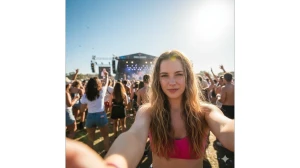
"Create a selfie of a young woman at a music festival. The sun is high in the sky, causing her to squint and creating a hazy lens flare. Simple but effective. The squinting detail is what makes this feel real – it’s something that actually happens in bright sunlight."
Prompt 10:
"Create a candid laughing portrait of a young woman with freckles, head tilted back in genuine joy, golden hour sunlight creating a warm lens flare, beautiful bokeh background of a park."
Prompt 11:
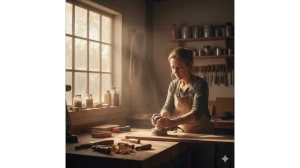
"Create an environmental portrait of a skilled carpenter sanding a piece of wood in their workshop, surrounded by tools, soft morning light filtering through a dusty window, candid moment, captured in a photojournalistic style."
Prompt 12:
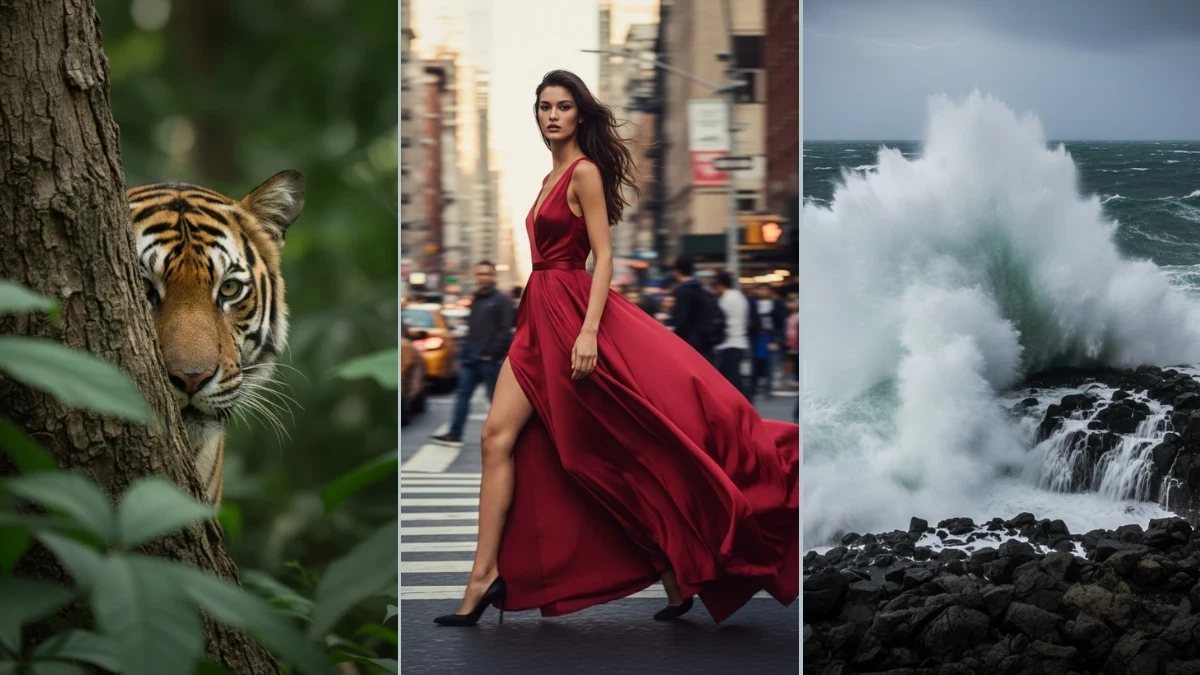
"Create a full-body fashion shot of a tall model in a flowing red dress walking down a bustling New York City street, motion blur in the background, subject is in sharp focus, dynamic pose, editorial style."
Prompt 13:
"Create a candid photo of a lonely man holding a coffee cup looking out a rain-streaked window, pensive mood, cool blue tones, reflections of city lights visible on the glass, soft focus on the background."
Prompt 14:
"Create a high-contrast, sun-drenched photo of a fit surfer carrying their surfboard on a beach in Australia, harsh midday sun creating strong shadows, vibrant colors, shot with a polarizing filter to deepen the blue of the sky and water."
Prompt 15:
"Create an authentic-looking photo of a family having a picnic in a park from the 1960s, shot on Kodachrome film, rich color saturation, capturing the vintage clothing and atmosphere of the era."
Prompt 16:
"Create a gritty, high-ISO photo of a lead singer of a punk rock band screaming into a microphone at a concert, lit by chaotic stage lights, visible film grain, capturing the raw energy of the moment."
Prompt 17:
"Create a documentary-style photo of an old woman buying spices in a crowded Moroccan street market, candid interaction, vibrant colors of the spice mounds, shallow depth of field isolating her from the chaos."
Prompt 18:
"Create a drone-style aerial photograph looking straight down at a small, isolated lighthouse on a dramatic coastline, waves crashing around it, top-down perspective."
Prompt 19:
"Create a photograph of a Tiger peering out from behind a tree using the “shoot through” technique, with foreground leaves slightly out of focus, creating depth and a voyeuristic feel."
Prompt 20:
"Create an underwater photograph of a majestic sea turtle surrounded by light rays filtering down through the water’s surface in the Great Barrier Reef, ambient light, slight motion blur from the current."
Image Credits: Google Gemini AI